A Cost Assessment is a structured evaluation of an organization’s IT and operational expenses to identify cost-saving opportunities, optimize spending, and align budgets with business objectives. It is crucial for financial planning, cloud migration, and IT cost optimization.
1. Purpose
- Analyze Current Spending
- Review infrastructure, application, and operational costs.
- Optimize Cost Efficiency
- Identify opportunities for cost reduction and better resource allocation.
- Plan for Budgeting & Forecasting
- Provide insights into future costs and financial planning.
- Improve ROI
- Ensure IT and cloud investments align with business value.
- Support Decision-Making
- Aid in cost-related decisions such as cloud migration, technology upgrades, and operational scaling.
2. Scope
- IT Infrastructure Costs
- Hardware, software, data centers, and cloud services.
- Operational Expenses (OPEX)
- Licensing fees, maintenance, support, and staffing costs.
- Cloud vs. On-Premises Comparison
- Cost analysis for cloud adoption vs. maintaining on-prem infrastructure.
- Resource Utilization & Waste Analysis
- Identifying underutilized or over-provisioned resources.
- Financial Impact of Optimization Strategies
- Cost savings through rightsizing, automation, or contract renegotiations.
- Total Cost of Ownership (TCO) & Return on Investment (ROI)
- Assessing the long-term financial impact of IT investments.
3. Step-by-Step Process
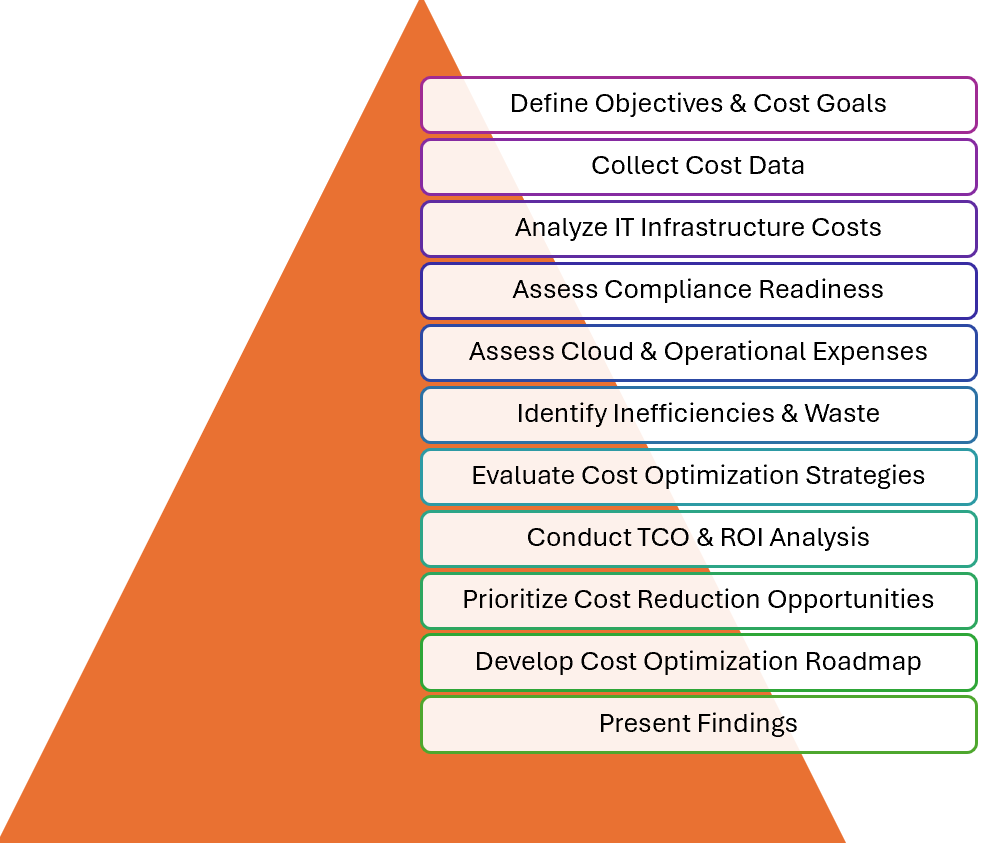
1. Define Objectives & Cost Goals
- Identify cost-saving targets, budget constraints, and financial objectives.
- Engage finance and IT teams to align priorities.
2. Collect Cost Data
- Gather financial reports, invoices, and billing statements.
- Inventory all IT assets and services, including cloud usage.
3. Analyze IT Infrastructure Costs
- Evaluate costs related to:
- Data centers and physical servers.
- Cloud services (compute, storage, networking).
- Software licenses and subscriptions.
4. Assess Cloud & Operational Expenses
- Compare on-prem vs. cloud costs.
- Review operational costs such as staffing, support, and maintenance.
5. Identify Inefficiencies & Waste
- Detect underutilized servers, idle cloud instances, and redundant software.
- Assess overprovisioned resources that drive unnecessary costs.
6. Evaluate Cost Optimization Strategies
- Recommend cost-saving methods such as:
- Rightsizing: Adjusting resource allocation to actual needs.
- Reserved Instances & Spot Instances: Optimizing cloud billing models.
- Automation & Scaling: Implementing auto-scaling to reduce waste.
- Vendor Negotiations: Optimizing contracts for better pricing.
7. Conduct TCO & ROI Analysis
- Compare the total cost of ownership (TCO) over time.
- Assess return on investment (ROI) for IT spending.
8. Prioritize Cost Reduction Opportunities
- Rank cost-saving initiatives by impact and feasibility.
- Focus on quick wins vs. long-term investments.
9. Develop Cost Optimization Roadmap
- Create a structured plan to implement cost-saving measures.
- Define timelines and responsibilities for execution.
10. Present Findings
- Deliver a detailed report covering:
- Current cost structure.
- Identified inefficiencies.
- Recommended optimizations.
- Cost savings projections.
4. Results
- Cost Breakdown Report
- Detailed analysis of infrastructure, cloud, and operational expenses.
- Waste & Inefficiency Analysis
- Identification of unused or overprovisioned resources.
- Cost Optimization Recommendations
- Actionable steps to reduce costs and improve efficiency.
- TCO & ROI Insights
- Long-term financial impact of IT investments.
- Optimization Roadmap
- Structured plan for cost reductions and efficiency improvements.
- Projected Cost Savings
- Estimated financial benefits from implementing recommendations.
5. Services on Cloud:
- AWS:
- AWS Cost Explorer: Tracks, analyzes, and predicts AWS usage costs.
- AWS Pricing Calculator: Estimates costs for AWS services based on specific requirements.
- Azure:
- Azure Cost Management + Billing: Monitors and optimizes Azure spending.
- Azure Pricing Calculator: Calculates estimated costs before deploying Azure services.
- GCP:
- Google Cloud Pricing Calculator: Estimates costs for Google Cloud services.
- Active Assist Cost Recommender: Provides recommendations for cost reduction based on usage patterns.
Conclusion
By conducting a Cost Assessment, organizations can reduce unnecessary spending, optimize IT investments, and improve financial sustainability, ensuring that resources are allocated efficiently.
Reference
- https://minhvuilendi.com/2025/02/04/cloud-readiness-assessment-more-details/
- https://minhvuilendi.com/2025/02/04/application-assessment-more-details/
- https://minhvuilendi.com/2025/02/04/infrastructure-assessment-more-details/
- https://minhvuilendi.com/2025/02/04/data-assessment-more-details/
- https://minhvuilendi.com/2025/02/04/security-and-compliance-assessment-more-details/
- https://minhvuilendi.com/2025/02/04/performance-assessment-more-details/





 VuiLenDi
Leave a comment